Table of Contents
- Synthesia at a glance
- What Synthesia is designed to do
- How we evaluated Synthesia
- Core features and buyer value
- Example Synthesia workflow
- Synthesia pricing in 2026
- Security, privacy and governance questions
- Advantages
- Limitations and unresolved questions
- Who should use Synthesia?
- A practical pilot plan
- Procurement checklist
- Synthesia alternatives
- Is Synthesia worth it?
- Final verdict
- Frequently asked questions
Synthesia is AI video creation platform for business. Synthesia is a mature shortlist option for organisations producing repeatable training, onboarding and internal video in many languages. It can reduce filming overhead dramatically, but teams should govern avatar consent, factual accuracy, pronunciation, brand quality and credit consumption rather than measuring only production speed.
This review answers the practical buying questions: what the product actually does, where it may create value, what remains unverified, how pricing works, and what a responsible pilot should measure. We separate observed public evidence from vendor claims and do not assign a numerical rating without repeatable authenticated testing.
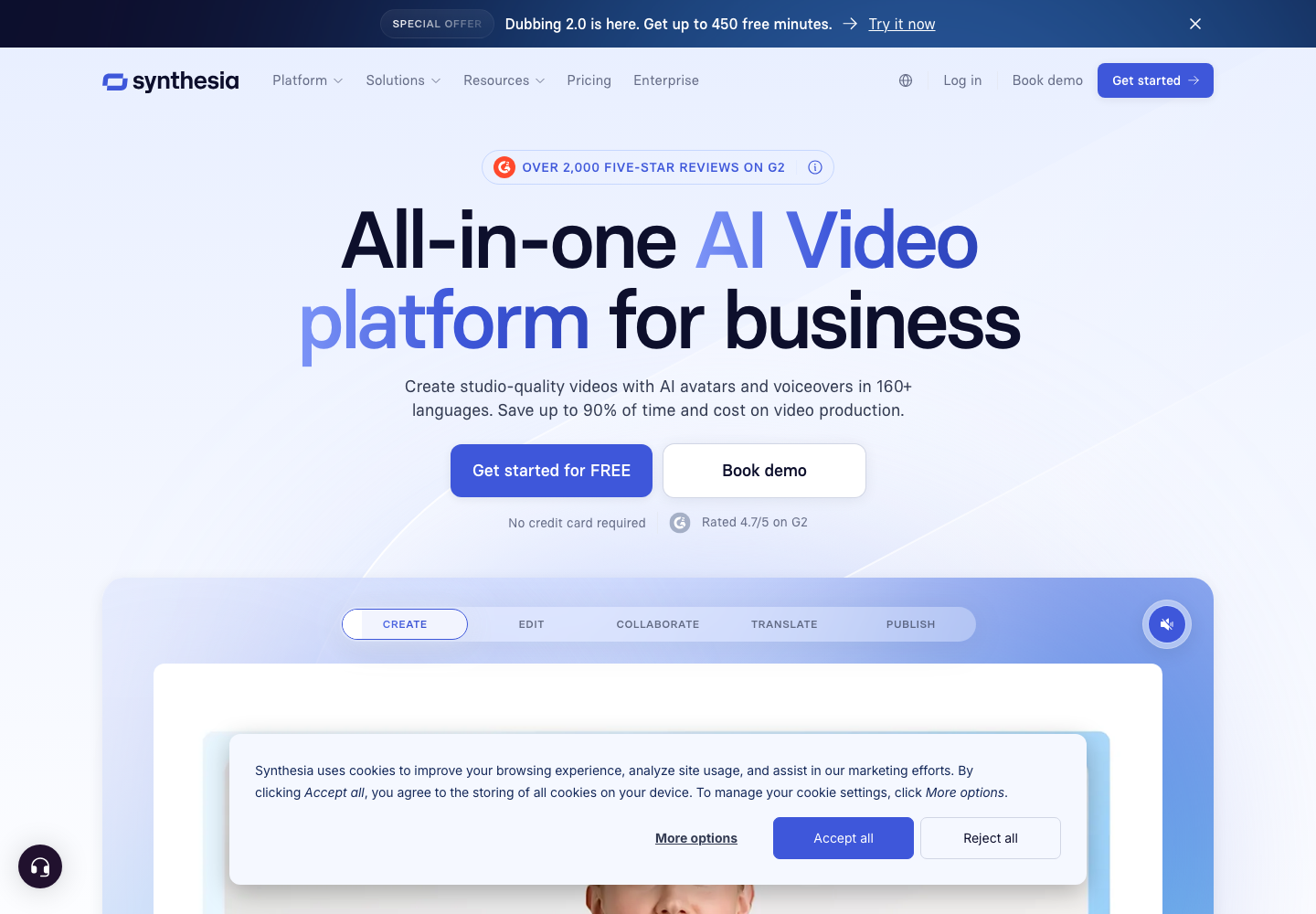
Authentic homepage evidence from Synthesia. The interface and claims may change after capture.
Synthesia at a glance
| Question | Answer |
|---|---|
| What is it? | AI video creation platform for business |
| Best for | learning, enablement and communications teams producing frequent scripted business videos |
| Less suitable for | cinematic productions, unscripted storytelling or sensitive communication needing unmistakably human delivery |
| Pricing | Sales-led unless stated otherwise below |
| Review access | Public-evidence first look; no authenticated workspace |
| Main buying test | Prove accurate, governed outcomes on representative work |
What Synthesia is designed to do
The product is designed around five buyer jobs:
- Turn scripts and documents into presenter-led videos
- Localise content across more than 160 languages
- Create personal or branded avatars
- Collaborate on templates and video workspaces
- Update recurring training without reshooting
The important distinction is between a capability demonstrated on a website and a dependable operational result. A buyer should translate every claimed feature into a task, a source of truth, an acceptable error rate and a named owner. That makes a pilot comparable with the current process and prevents an attractive demo from becoming the success criterion.
How we evaluated Synthesia
This is not a hands-on review. We reviewed the official positioning, publicly described capabilities and available commercial information, then designed a testing framework based on the risks of the category. We did not create a workspace, connect live company data or reproduce performance claims.
Our evaluation asks six questions:
- Does the product solve a frequent, costly job rather than add another dashboard?
- Can users inspect the evidence behind outputs and actions?
- What permissions and sensitive data does it require?
- How does it behave with missing, conflicting or adversarial inputs?
- Can actions be approved, reversed, exported and audited?
- Is the full cost justified by measured time, risk or revenue outcomes?
For teams evaluating AI software, our AI Tool Chooser can turn requirements into a more disciplined shortlist. If usage pricing is material, the AI Token Cost Calculator helps model scenarios before vendor negotiations.
Core features and buyer value
AI avatars and voices
Large avatar and language libraries reduce filming requirements. Test pronunciation, gesture, cultural fit and disclosure with target audiences.
Text and document workflows
Scripts, slides and templates can accelerate production. Subject experts must approve facts before generation.
Custom avatars
Personal avatars provide brand continuity while requiring explicit performer consent and offboarding controls.
Collaboration and governance
Workspaces, guests and enterprise controls support teams. Check roles, approval, SSO, audit and asset ownership.
Credits and regeneration
Usage is measured in credits and seconds; revisions consume additional credits for regenerated content. Budget for iteration, not only final minutes.
Example Synthesia workflow
Rebuild one ten-minute training lesson in three languages. SMEs approve the script, native speakers review pronunciation and tone, and the team measures production time, revision credits, accessibility and learner comprehension against the original.
The workflow should be repeated with normal, edge-case and deliberately difficult inputs. Record completion, human edits, exceptions, failures and downstream consequences. Average quality can conceal a small number of expensive errors, so results should also be segmented by task and risk.
Synthesia pricing in 2026
Synthesia lists Starter at $29 monthly or $264 annually, Creator at $89 monthly or $804 annually, and Enterprise on custom terms. A free Basic experience is available. Starter includes about 10 video minutes monthly and Creator about 30; unused allowances do not roll over.
Pricing was checked on 20 July 2026 and can change. Ask the vendor to separate platform, implementation, usage, connectors, storage, support and overage costs. Build low, expected and high-volume scenarios, include internal administration, and insist that renewal assumptions are visible. A discount on an unclear unit of consumption is not cost predictability.
Security, privacy and governance questions
Before connecting production data, request the current security pack, subprocessors, architecture, data-flow diagram, retention schedule, deletion process and incident terms. Confirm encryption, SSO, role-based access, audit logs, regional processing, model-provider terms and whether customer data trains shared systems.
Create separate permissions for reading, drafting and acting. Use service identities rather than personal credentials, and give every automated action an owner, limit and revocation path. Test prompt injection and poisoned source content where AI interprets untrusted text. Export and deletion should be demonstrated, not answered only in a questionnaire.
If the product influences public visibility, customer communication or generated answers, establish an external baseline with our LLM Visibility Checker and document what changed. Software can reveal or automate work, but it does not replace the authority signals created through relevant coverage and credible sources; that is where 1stpage Agency’s link-building services serve a different execution need.
Advantages
- Strong business-video and localisation focus
- Public self-serve pricing
- Large avatar and language catalogue
- Enterprise security and governance options
Limitations and unresolved questions
- Generated presenters can feel inappropriate for sensitive topics
- Credits and revisions affect total cost
- Avatar and voice consent require governance
- Visual sameness can weaken engagement
These are diligence items rather than automatic disqualifiers. The purpose of a pilot is to convert them into evidence, contractual commitments or a clear decision not to proceed.
Who should use Synthesia?
Synthesia is best suited to learning, enablement and communications teams producing frequent scripted business videos. The team should have a measurable baseline, an operational owner and enough representative work to test repeatably.
It is less suitable for cinematic productions, unscripted storytelling or sensitive communication needing unmistakably human delivery. In that case, a narrower tool, existing platform capability or improved manual process may create more value with less integration and governance overhead.
A practical pilot plan
Start with one bounded workflow and 30 to 100 representative cases. Include routine examples, edge cases, incomplete inputs and known failures. Keep a human-labelled reference set hidden from the system, then measure accuracy, completion, time saved, edit rate and serious-error frequency.
During week one, connect only a sandbox or read-only source. During week two, let users review suggested outputs. During week three, enable reversible low-risk actions if thresholds are met. Preserve the existing process as a control group. Interview both enthusiastic and reluctant users; adoption data without reasons is difficult to interpret.
Define stop conditions before testing. Examples include exposure of restricted data, actions outside scope, unsupported claims, unrecoverable changes or a serious error above the agreed threshold. At the end, calculate value after review time, exceptions, implementation, licences and retained tools—not before those costs.
Document the baseline before the vendor configures the pilot. Record current cycle time, labour, error and exception rates, existing software cost, user satisfaction and the business consequence of failure. Keep the original input set and scoring rubric so competing products can be tested fairly. When the pilot ends, distinguish one-off onboarding gains from improvements likely to persist at full scale. A credible decision memo should show the measured evidence, unresolved risks, sensitivity to higher usage and the conditions that would trigger renewal, expansion or exit.
Procurement checklist
- Obtain an itemised three-year cost model and renewal cap.
- Confirm contract definitions for users, assets, tasks, usage and overages.
- Map every integration, permission and data category.
- Require export formats, deletion timing and transition assistance.
- Review uptime, support severity, recovery and incident commitments.
- Agree pilot acceptance thresholds and who signs them off.
- Ask for references with similar scale, industry and workflow complexity.
- Document which vendor claims remain unverified.
Synthesia alternatives
| Alternative | Consider it when |
|---|---|
| HeyGen | Marketing video and avatar flexibility fit better |
| Colossyan | Learning-focused AI video workflow is preferred |
| Loom | Fast authentic screen and webcam communication dominates |
| Canva | Broader visual content creation matters |
| Human production | Emotional credibility and cinematic quality are critical |
An alternative should be tested on the same input set and scored against the same outcomes. Feature counts are a weak comparison because two products may label a capability similarly while requiring very different implementation, review and governance effort.
For another view of how we separate product claims from buyer evidence, see our Nimt.ai review and Peec AI review. Those products serve different jobs, but the citation, pricing and pilot disciplines remain relevant.
Is Synthesia worth it?
Synthesia is a mature shortlist option for organisations producing repeatable training, onboarding and internal video in many languages. It can reduce filming overhead dramatically, but teams should govern avatar consent, factual accuracy, pronunciation, brand quality and credit consumption rather than measuring only production speed.
The strongest purchase case is a measured improvement in a costly recurring workflow. The weakest is a broad ambition to “use AI” without baseline data, owners or acceptable-error definitions. Enter commercial discussions with the pilot dataset and security questions prepared; that changes the conversation from feature theatre to operational evidence.
Final verdict
Synthesia deserves consideration for the specific best-fit users identified above, but this research-based review cannot establish production reliability or return on investment. Shortlist it if the workflow is frequent and valuable, then require a controlled pilot, inspectable evidence, reversible actions and transparent total cost. Do not scale solely on vendor-reported outcomes or a curated demonstration.
Frequently asked questions
How much does Synthesia cost?
Starter is listed at $29 monthly and Creator at $89 monthly, with discounted annual prices and custom Enterprise terms.
Can Synthesia be used free?
A free Basic experience is available with limited usage.
Do unused video credits roll over?
Synthesia states that unused allowances do not roll into the next billing period.
Was this Synthesia review hands-on?
No. It is a research-based first look using official public evidence. No authenticated workspace or production integration was tested.
Did Synthesia pay for inclusion?
No commercial relationship was disclosed for this review, and no rating was assigned.

Tolu S.
Associate Director
Evidence-led product reviews and founder profiles for search, marketing, authority, and AI visibility teams.